Your year in books

Paste a public Goodreads profile. Reading Wrapped reads your read shelf and builds a share image from it, in your browser.

How to copy your Goodreads link
  1. More → My Profile
  2. Tap the share icon, then Copy link.
  3. Paste the whole shared message above.

Before importing: your Goodreads profile and “read” shelf must be public.
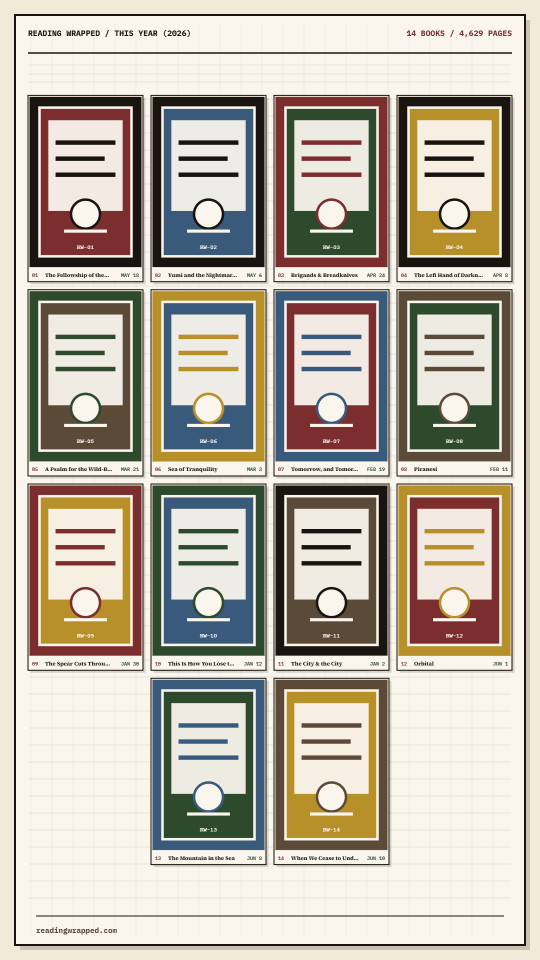
Example recap: a grid of book covers under a Reading Wrapped heading with book and page totals.
Cover wall · one of six layouts Open a sample shelf →
Public profiles only Your export stays in this browser
How it works

From profile URL to finished image.

01

Paste your Goodreads profile URL

Reading Wrapped looks for your public Goodreads read shelf through the public RSS feed.

02

Choose the reading year or range

Filter by a Goodreads read-date year, this month, the last 12 months, undated books, or your full shelf.

03

Review books, covers, and stats

Fix titles, fill missing ISBNs, swap covers, and choose what appears in the recap image.

04

Export a shareable recap image

Save a PNG for Instagram stories, TikTok, group chats, newsletters, or reading threads.

What you get

What ends up in the image.

Every recap is built from your read shelf: books finished, covers, ratings, page counts, read dates, and a month-by-month view when Goodreads has the dates.

  • Goodreads read-shelf import from a public profile
  • Yearly reading recap, rolling 12-month view, or all-books mode
  • Editable book titles, ISBNs, cover choices, and visible books
  • Six image templates for book wrapped and reading stats posts
FAQ

Common questions

Is Reading Wrapped affiliated with Goodreads?

No. Reading Wrapped is an independent tool that reads public Goodreads shelf data when you paste a profile URL.

Do I need a public Goodreads profile?

Yes. Reading Wrapped uses Goodreads' public RSS feed, so your profile and read shelf need to be public for import to work.

Can I share my Reading Wrapped on Instagram or TikTok?

Yes. The app generates a share image that you can save and post anywhere you normally share images.

Does this work for any reading year?

After import, you can filter by years found in your Goodreads read dates, use the current month, the last 12 months, undated books, or all books.

What data is imported?

Reading Wrapped imports public read-shelf details such as book titles, authors, ISBNs when available, ratings, read dates, page counts, and cover URLs.

The wrong edition or cover showed up. Can I fix it?

Yes. Reading Wrapped shows the edition your Goodreads shelf points at. You can swap the cover inside the app, or change the edition itself on Goodreads: open the book, click Edit my activity, click Change edition, pick one and click Switch to This Edition, then sync your shelf again.

Is my data stored?

The app does not require an account. Public shelf responses may be cached briefly to speed up repeat imports; your review edits and exported image stay in your browser.